
Two rates, because a package is not a bottle of lotion
Each person on staff has two commission rates: one for tanning and one for retail. Tanning covers packages and memberships, plus the charges taken at check-in, such as a single visit or a bed-level upgrade. Retail is anything sold off the shelf, like lotion. A manager types each rate as a percent, such as 10 or 12.5, and anything above 90% is refused as a typo.
Commission comes from the sales your desk already rang up, so there is nothing to export or re-key at the end of the month. Tax never earns commission, and a voided ticket earns nobody anything. Commission is worked out on each person's tanning total and retail total and rounded once, so the figure can be checked against a payslip.
Commission set on the package itself
Some salons pay a flat amount for each membership sold rather than a percentage. Any package or product in Inventory can carry its own commission: a rate, a flat fee per item, or both. A line whose package names its own commission pays exactly that and nothing from the seller's tanning or retail rate. Lines that name nothing fall back to the person's own rates.
- A fee is per item, so three bottles sold pay three fees.
- The package's commission is recorded on the sale when it is rung up, so changing the package later does not reprice what was already sold.
- These lines show as their own row, with what they sold beside them, so the percentage rows always multiply out.
Bonuses for what a till cannot count
A manager can add a bonus to anyone's month with an amount, a reason and the date it was earned, such as a spiff for clearing old bronzer stock. A bonus can also be negative, to record a clawback on a returned package. Only approved bonuses count toward what someone is owed, and a bonus a manager adds is approved as it is entered. Staff cannot create bonuses, and a colleague's bonus is shown only to that person, to managers and to anyone you have let see pay.
A leaderboard the whole desk can see
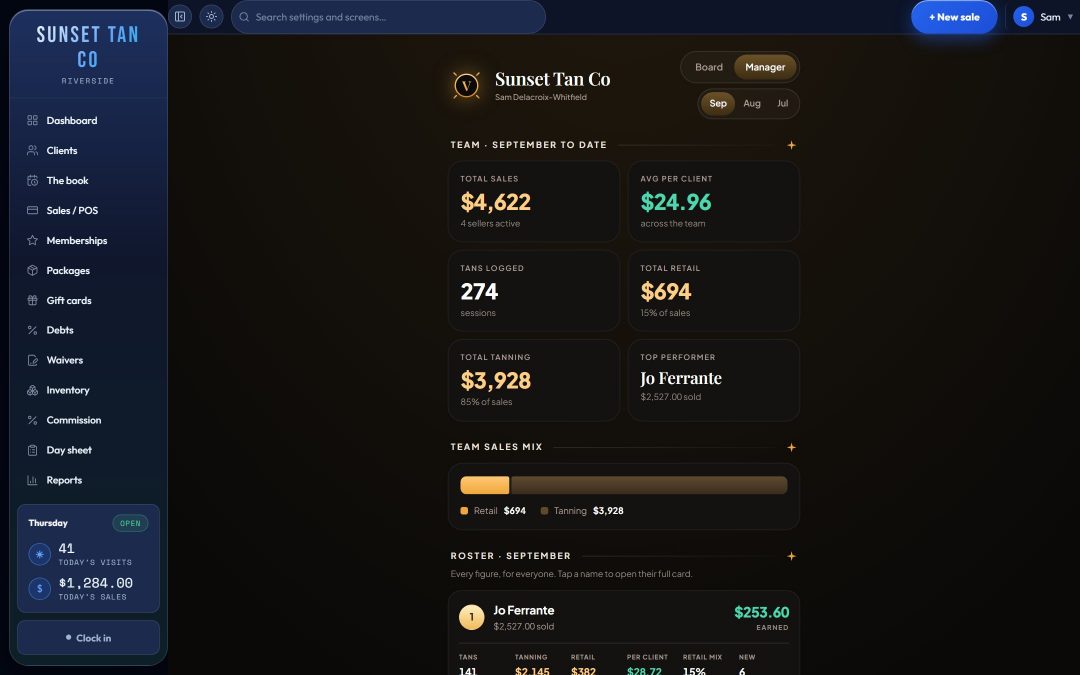
The commission page is a leaderboard for this month or either of the two months before it, and everyone who works at the salon can open it. People are ranked by commission. Each person's own view shows the full picture:
- What they sold, split into tanning and retail.
- The tanning sessions they checked in and the clients they served.
- How their pay is built: each rate, the amount it applied to and what it paid, plus any package-set commission and approved bonuses.
- How their total earned and their per-client average compare with the team.
A colleague's card shows their name, rank, commission, per-client average, retail mix and new clients added. Their sales totals, bonuses and rates are left off the board. That is a scoreboard choice, not a privacy wall: the till shows sales to every login, so the board never claims coworkers cannot see them.
Sales goals and targets are not built. The board ranks people by commission and shows each person against the leader.
What managers see
Managers, and anyone you let see pay and commission, get a Manager tab with every figure: team totals, the sales mix, the roster, each person's rates and every bonus. It also says how much was sold with nobody on staff recorded against it, rather than leaving that gap unexplained. The People tab in reports shows what each person sold, the commission owed and their hours on the clock for any date range, and it uses the same calculation as the board.
Before you change a rate
The board works every month out at each person's current tanning and retail rates. Change someone from 12% to 8% partway through a month and the figures for the earlier days change too; put it back and they return. Commission set on a package is the exception, because it is stored on each sale. Note the figures before you change a rate in the middle of a pay period.
Setting rates and adding bonuses stay with managers by role. You can let a trusted employee see pay and commission, but that permission never lets them change a rate, including their own.
Related features
Commission reads from the till, your retail and lotion inventory and the packages and memberships you sell. Who can open the pay figures is set in staff roles and the time clock, and the same numbers appear in reports. To walk through a month of commission with your own rates, book a demo.
Common questions
- Can staff see what their coworkers sold?
- Not on the commission board, which shows a colleague's rank, commission, per-client average, retail mix and new clients, but not their sales totals, bonuses or rates. Sales are visible on the till to every login because the desk needs them, so the board is not a way to keep sales private.
- Can I pay a flat amount for each membership sold?
- Yes. Set a commission fee on the package in Inventory. That line then pays the fee, per item, instead of the seller's tanning percentage. A package can carry a fee and a rate together.
- Does a bed-level upgrade count as tanning or retail commission?
- Tanning. An upgrade or single-visit charge taken at check-in has no retail product behind it, so it earns the seller's tanning rate.
- Does TanVision track tips?
- No. The till has no tip line today, so there is nothing to report on or add to commission.
- Can I set sales goals for my team?
- Not today. The board ranks people by commission and shows each person against the leader, but goals and targets are not built.