
What ended on October 14, 2025
Microsoft ended support for Windows 10 on October 14, 2025. A Windows 10 PC still turns on and still runs its programs. What stopped is security updates and fixes, feature updates and technical support from Microsoft. Microsoft warns that without those updates the PC is at greater risk from viruses and malware.
Microsoft points to two ways forward: upgrade to Windows 11, or pay for Extended Security Updates. For a business, ESU delivers security updates for at most three years after the end of support, and it does not include technical support.
Why it matters at a tanning salon's counter
When tanning software is installed on a Windows PC in the salon, that PC runs the front desk: check-in, the till, client records with dates of birth and phone numbers, and package balances. If that machine is on Windows 10 and not enrolled in ESU, the software your salon depends on sits on an operating system that no longer gets security fixes.
It also ties the owner to one box. TanVision was built alongside a working salon whose owner checked the room board by using remote desktop to reach a Windows PC in the salon.
Your three options
Each option solves a different part of the problem.
| Option | What it fixes | What it leaves |
|---|---|---|
| Upgrade the PC to Windows 11 | Security updates for the operating system resume | Your tanning software has to support Windows 11, so ask its maker. The software still lives on that one PC |
| Pay for Extended Security Updates | Security updates for up to three years, for a business | No technical support, a cost every year, and the same decision later |
| Move the front desk to browser-based software | The salon's software and records no longer live on one PC | Whatever computer you keep still needs a supported operating system |
The options are not either-or. You can move to browser-based software and still upgrade or replace the counter PC. The difference is that the PC becomes a screen and a keyboard rather than the place the business lives.
What changes when the desk runs in a browser
TanVision is tanning salon software that runs in a web browser. Nothing is installed on the counter PC, and the same salon opens on a desk computer, a tablet or a phone.
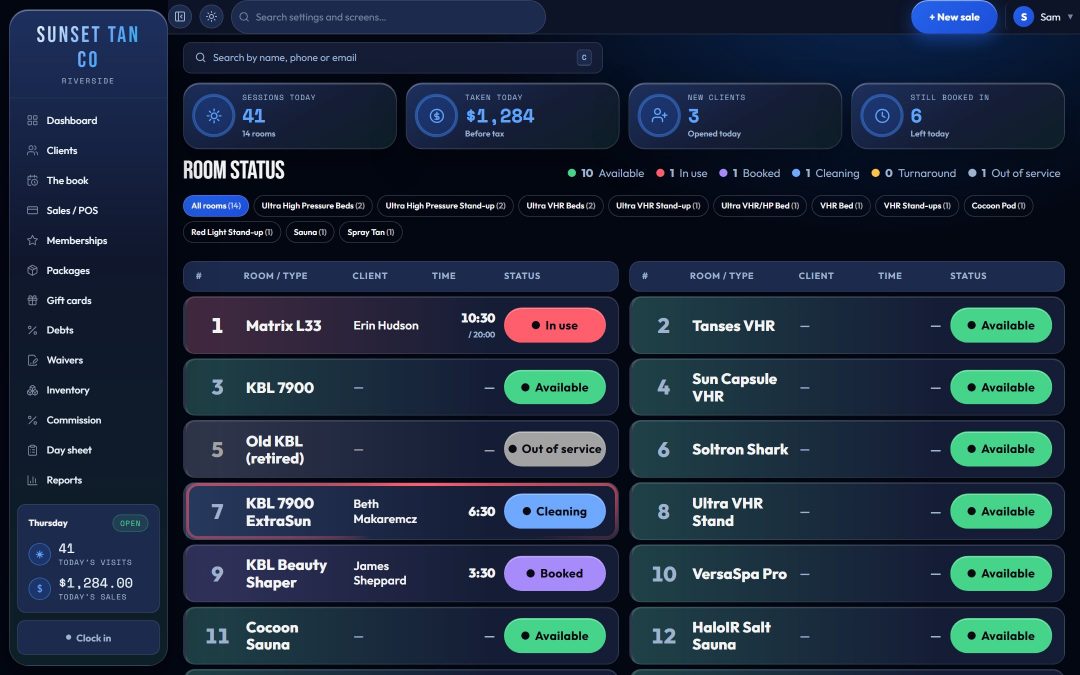
- The floor board shows every room as free, running or needing cleaning, with the time left. It updates on every screen at the desk without a refresh, and one of its four layouts copies a classic room-status board with status lights and color-coded boxes.
- The owner can open the same board on a phone instead of remoting into a PC in the salon.
- A broken counter PC is replaced by signing in on the new one. The salon's records were never on it.
- Your salon's rules run on every check-in, whatever device the desk uses: the skin-type schedule and the gap between UV sessions as your salon sets them, each room's maximum minutes, and the paperwork and age check. See exposure safety.
- Keytags keep working. The scan box searches the whole client record and enforces no tag format.
- Reports: 32 ready-made reports, plus a close-out and a day sheet that prints.
- Each salon sees only its own data, and the database enforces it. It is tested from a second salon's side: a full check on 22 Sep 2026 read none of the first salon's rows across 71 tables, and the full check before it, on 13 Sep, could change or delete none of them.
What to plan for before you retire the Windows PC
Be clear about what an installed Windows system could do that TanVision does not do today.
- Internet. An installed Windows program can keep running when the internet drops. TanVision is cloud software and needs a connection, and offline trading is not something we can promise today.
- Bed timers. TanVision sends session times to the beds only through T-Max timer controllers, using a small box TanVision supplies that sits on your network next to the T-Max controller. Other timer brands are not supported yet, so if the counter PC starts your beds through another brand, plan how the desk will set timers.
- Cards. TanVision's built-in card processing needs your salon's own merchant account and a supported card terminal at the counter, so ask about both on the demo. TanVision cannot import cards saved in your old system, so members on monthly auto-pay save a card again on the card processor's secure page.
- The old PC itself. If you keep it for anything else, it still needs Windows 11 or ESU. Moving your salon software to a browser does not patch the operating system underneath.
Moving over
Before the old PC is wiped or unplugged, take a final copy of your client list with dates of birth and keytag numbers, every open package with sessions left and expiry, each client's visit history, unspent gift certificates, and each bed's lamp hours. TanVision imports the client list, the open packages and the visit history from spreadsheets saved as CSV, so export those three; the gift certificates and lamp hours are entered by hand.
The switching guide covers what moves over, the package trap to avoid and a day-one checklist. For the wider case, see cloud tanning salon software. When you are ready, book a demo and we will walk through your move.
Common questions
- Will my tanning salon software stop working now that Windows 10 support has ended?
- Windows 10 itself keeps running. Microsoft says Windows 10 PCs keep working after October 14, 2025, but they no longer get security updates, feature updates or technical support. Whether your tanning software is still supported on Windows 10 is a question for its maker.
- Are Extended Security Updates enough?
- They buy time. For a business, Microsoft's paid ESU program delivers security updates for at most three years after the end of support, and it includes no technical support. Your tanning software still lives on one PC.
- Does TanVision need Windows?
- No. TanVision runs in a web browser on a desk computer, a tablet or a phone, with nothing to install on the counter PC. Whatever computer you use should still run a supported operating system.
- What happens to my data if the salon's computer dies?
- Nothing is lost. Your salon's records (clients, packages, sales and visits) are stored online, not on the computer, and backed up automatically every day; the backups are encrypted and kept for 7 days. Sign in on another computer, tablet or phone and carry on.
- Does TanVision work when the internet is down?
- Plan on needing a connection. TanVision is cloud software, and offline trading is not something we can promise today. If outages are common where you are, raise it on the demo.
- Can TanVision control my tanning bed timers?
- Yes, if they run on T-Max timer controllers. When a client is checked in, the desk sends the session's minutes to the bed's own timer through a small box TanVision supplies, which sits on your network next to the T-Max controller, and Stop clears the time. Other timer brands are not supported yet. If your current PC sends time to your beds through another brand, plan how the desk will set timers before you switch, and ask about it on the demo.