
Where package balances go wrong
Most package trouble at a tanning desk is small and expensive: a ten-visit pack still being used a year later, an unlimited plan used three times in one day, a balance nobody can explain, or a package that rang up at the till and never reached the client's account.
TanVision treats a package as a set of terms, not just a price. Selling it creates the client's membership in the same step, check-in draws on it, and the terms decide what the desk can do.
Session packs and unlimited plans
Every package is one of two kinds. A session pack grants a set number of visits. An unlimited plan runs until its expiry date. Both are sold on the same ticket as lotion, walk-ins and upgrades.
- Expiry: set a number of days from the start date, for packs as well as unlimited plans. Leave it blank and the package never expires.
- Visit caps: a daily or weekly limit stops an unlimited plan being used three times a day. Weekly caps count from Monday. A cap blocks the package, not the client, and the desk is told to ring the visit up as a walk-in.
- Start dates: a package bought today to start on the 1st cannot be drawn on before it starts.
- Last day: a package works until the end of its last day in the salon's own time zone.
- Running low: when a pack is down to its last two sessions, the desk sees a note at check-in.
Terms are locked in at the sale
When a package is sold, TanVision copies the session count, the price paid and the expiry date onto the client's membership. Change a package's price or length next month and clients who already bought it keep what they bought. The record can still answer how many of ten visits were used.
Selling and granting happen in one step. If the package cannot be put on the client's account, the sale is voided rather than left standing. Only a manager can void a sale, and a void also cancels the package it granted, so a refund never leaves sessions on the account.
Switching from another system? Check for packages that came across as retail items: they ring up for the right money and grant nothing. Inventory → Make package converts one in place, and Convert all fixes the catalogue at once. The switching page covers the rest of the move.
Freezes, corrections and cancellations
Some front-desk requests do not fit a till: a client going away for three weeks, a session lost to a broken bed, a wrong start date. TanVision gives each one a place and a record.
- Freezing follows your rule, set at Settings → Membership rules: whether packages can be frozen at all, the most days a freeze gives back, the fee, and whether employees may do it.
- Unfreezing moves the expiry out by the days the package was held, up to your limit, and the screen says when the limit applied.
- A freeze fee is charged when the freeze starts, never to unfreeze, and it is rung up as a sale with the payment type the desk picked.
- Managers can correct an expiry, a start date or a session balance, or cancel a package. Each correction needs a reason and records who made it.
- Cancelling ends the package without moving money. A refund is a void at the till, which is a separate decision.
- Employees can freeze a package if you allow it. To let a trusted employee make the corrections above too, give them the Change a client's package box. Each change still needs a reason.
Monthly auto-pay memberships
A monthly package can carry the agreement terms salons attach to a recurring membership. On the package form, tick Bill it monthly on auto-pay, and these options appear:
- A setup fee, charged at the till when a client first buys the package.
- The number of payments, or empty to run until cancelled.
- A minimum number of payments, and whether the client may cancel.
- An option to prorate an unlimited package's first month to the 1st, so the till charges only the days left in the month.
- Whether the setup fee earns loyalty points and commission.
The setup fee and a prorated first month are taken at the till as part of the package sale. After that, TanVision charges each payment itself, through its built-in card processing, connected to your salon's own merchant account. The client saves a card on the card processor's secure page, on the counter tablet or from a link texted to them, and TanVision charges it each period with the tax, on the membership's schedule. A payment that does not go through is tried again.
TanVision never sees or stores the card number. The card processor keeps it, and TanVision holds only a reference to it. A card is kept on file only for a monthly recurring membership.
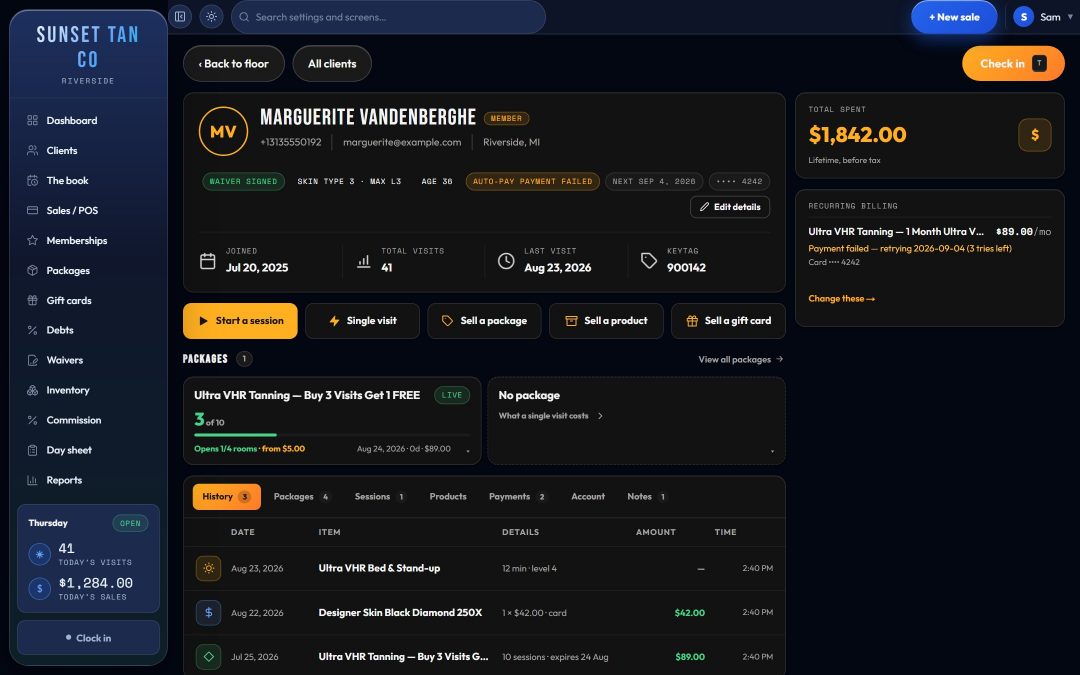
Memberships → Recurring lists every member on auto-pay, with the price a month, the next charge and the card on file. A manager can freeze, resume or cancel an agreement, and the package's minimum and cancellation rule travel with it, so a later change to the package does not rewrite what a member agreed to.
A monthly membership can also be shared. On the package, the salon sets how many people may share it and an add-on price for each extra person. Adding someone is rung up at the till at the add-on price, prorated when the package prorates. One card then pays for everyone: the owner's monthly charge is their own price plus each sharer's add-on, and each sharer's month ends with the owner's. The auto-renewal laws guide covers the disclosures to plan for.
Pricing, tax and member rates
Each package carries its own sales tax rate or tax category, and a tanning service can carry a separate excise rate that is stored apart from sales tax on every line. See tax and excise and the tanning excise tax guide.
A package can also give its holders a member discount on retail and on services. A client holding two packages gets the better rate, not both added together, and only packages still in use count.
Which rooms a package opens, and what an upgrade costs, is set in the access matrix, covered on bed levels and upgrades. For a pricing framework, read how to price tanning memberships.
Seeing what you have sold
- Memberships has two tabs: Recurring, one card per member on auto-pay, and Packages, every other package in the salon with what is left on it.
- Packages shows what sells, what it brought in, and how many paid-for visits are still owed.
- The Package revenue report shows each package's takings, how many are live and the sessions still owed. Package life shows how long packages last from sale to use-up or expiry, and how much of each gets used.
- A client's record lists their packages. Tap one to see every room it opens and what each upgrade costs.
- Commission can be set per package as a rate, a flat fee or both.
Related features
Bed levels and upgrades decides which rooms each package opens, tax and excise prices each line, reports read the results back, and staff commission pays the desk for what it sells. To walk through your own package list, book a demo.
Common questions
- Can TanVision handle both tanning packages and unlimited memberships?
- Yes. A session pack grants a set number of visits and an unlimited plan runs to an expiry date. Both can carry an expiry, daily and weekly visit caps, a tax rate and their own rules for which rooms they open.
- Can a client freeze a tanning membership?
- If your salon allows it. Settings → Membership rules decides whether packages can be frozen, the most days a freeze gives back, the fee, and whether employees may do it. Unfreezing moves the expiry out by the days held, up to your limit.
- Does TanVision run EFT or auto-pay billing?
- Yes. A monthly package can bill on auto-pay through TanVision's built-in card processing, on the terms you set: a setup fee, the number of payments, a minimum and a cancellation rule. The client saves a card on the card processor's secure page, TanVision charges it each period with the tax, and a payment that does not go through is tried again. TanVision never sees or stores the card number.
- What happens to a package if the sale is voided?
- Voiding the sale also cancels the package it granted, so the refund and the sessions stay in step. Only managers can void a sale.
- Do price changes affect packages already sold?
- No. The sessions, the price paid and the expiry are copied onto each client's membership at the sale, so a later change to the package only affects new sales.