
Close the day on one printed page
The day sheet is one day at the desk, line by line, and it prints from the browser. It leads with the takings, then shows sales before tax, sales tax, tickets, sessions and minutes, and new clients. When your tanning services carry an excise, the excise total appears on its own, marked as filed separately, and is never folded into sales tax.
The close-out table splits the day by tender: tickets, sales, tax and what was taken. The cash row is highlighted because it is the one somebody counts. If a client paid part of a ticket with a gift certificate, that part is left out of what the drawer should hold, because that money came in on the day the certificate was sold. Two ruled lines, Counted by and Checked by, sit under the table for signatures.
- Every ticket in the order it was rung up: the client, who sold it, how it was paid, and each line tagged as a package, retail or a session charge. Voided tickets stay on the sheet with the name of whoever voided them.
- Who was on the clock, with in, out and hours, and anyone still clocked in.
- What sold off the shelf, in units, for the morning count.
- Waivers signed, appointments booked, no-shows and voided tickets.
A session log with the tanning detail
Beside the money, the day sheet lists every session: the time, the client, the room with its type and bed level, the minutes, the client's session number, the skin type on file at that session, who checked them in, and whether it came off a package or was a walk-in. The Sessions tab of the reports dashboard lists sessions for any date range too, newest first, with the package each one came off and who sent it.
That gives you a dated record of who tanned, where and for how long, without a paper log at the counter. What your state expects a salon to keep, and for how long, varies. Our recordkeeping guide covers it.
The reports dashboard
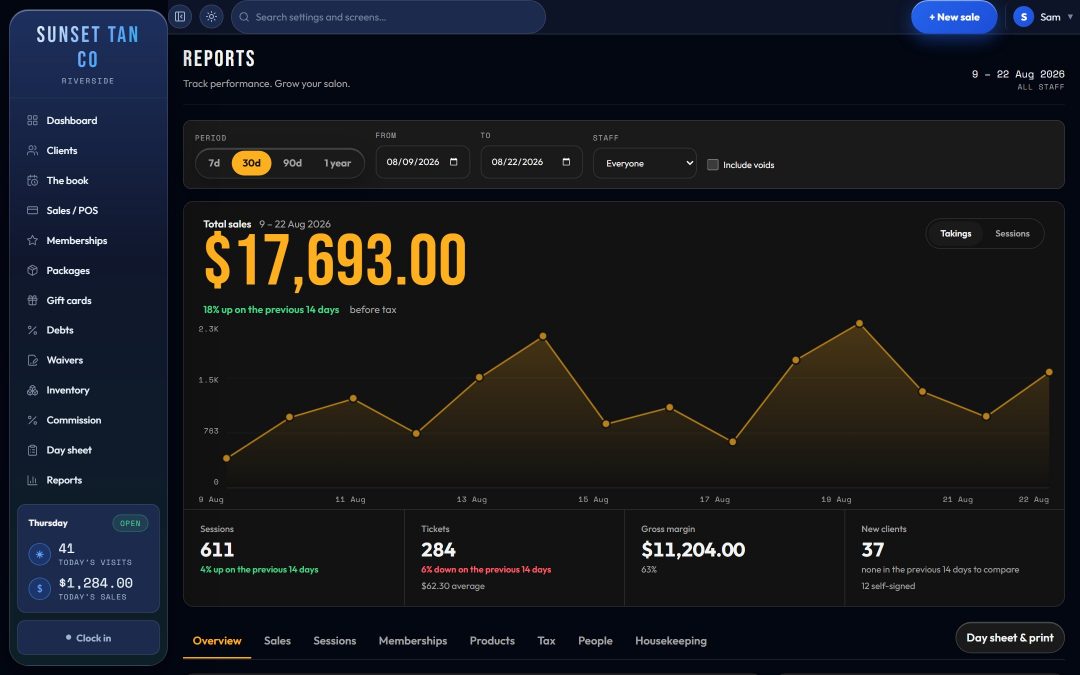
Reports opens on a date range and an optional staff filter, with the takings as the lead figure over a day-by-day chart. Tabs split the rest: Overview, Sales, Sessions, Memberships, Products, Tax, People and Housekeeping.
- Close-out for any range, by tender, tax included.
- Tax: taxable and exempt sales and the tax collected, taken from the rate recorded on each sale rather than today's rate, so a mid-period rate change does not rewrite past figures.
- Lapsed clients: anyone who has tanned before and has not been back for 45 days or more, with their phone number, as a list to work through.
- Memberships: what is live, what is frozen and what runs out soon.
- Products: top sellers, and an order list of items at or below their reorder level.
- People: what each person sold and their hours on the clock, plus commission owed for anyone allowed to see pay.
- Housekeeping: counts of clients with no signed waiver and clients with no skin type assessed, waivers signed on the public form, and voided sale lines in the period.
32 ready-made reports
The report library holds 32 ready-made reports, searchable by name or description. A sample of the ones built around how a tanning salon runs:
| Report | What it answers |
|---|---|
| Room usage | Sessions, minutes, average length and each room's share of all the minutes, with its lamp hours beside them. |
| Exceptions | Sessions that should not have happened as they did: no waiver on file, no date of birth, a minor without guardian consent, no skin type recorded, or a session sooner after the last one than your own gap allows. |
| Incomplete records | Clients missing a waiver, a skin type, a date of birth or a way to contact them. |
| Tax audit | Every taxed line at the rate actually charged, with the excise in its own section. |
| Tanning against retail | Service revenue against product revenue, month by month. |
| Package revenue | What each package brought in, how many are live, and the sessions still owed against them. |
| Package life | How long a package really lasts, from sale to used up or expired, and how much of it gets used. |
| Retention | Of the clients who first came in each month, how many were still coming 3, 6 and 12 months later. |
| Client status | Active, lapsing, lapsed and never-visited clients, with counts. |
| Time of day | Takings and sessions by hour, in your time zone, for deciding which hours to staff. |
| Voided sales | Every void: what, how much, who rang it up and who voided it. |
| Where clients come from | How new clients heard about you, and what each source has been worth. |
| Gift certificates | What is still owed on certificates sold, and every certificate still carrying a balance. |
| Time clock | Every shift, with hours totaled per person and open shifts flagged. |
The library also lists the reports TanVision cannot produce yet, such as summaries of auto-pay drafts and rejects, with a line on what each would need. An empty table with a title would read as a fact about your salon, so those stay marked as not available.
Numbers that hold up later
- Tax is stored on each line with the rate that produced it, so a quarter can be rebuilt line by line. The Tax audit report lists every taxed line with its ticket and who sold it, and puts the excise in its own section so it is never added into sales tax. See tax and excise.
- Every date and time follows the salon's own time zone, so a sale rung up late in the evening lands on the day it happened.
- Tickets, sessions, voids, gift certificates, discounts and new client records name the person behind them.
- Voided tickets are left out of takings and earn no commission, but they stay visible on the day sheet and in the Voided sales report.
Who sees the figures
Reports, the library and the day sheet are for managers by default. You can hand See the salon's figures to a trusted employee, or give a closer See the day sheet on its own, so they can count the drawer without the rest of the reports. Pay and commission is a separate permission, and gross margin shows only to people who can already see what stock costs. More in staff roles and the time clock.
Related features
Reports read from everything else in TanVision: tax and excise on every line, staff commission from the till, client records behind the lapsed list, and exposure safety behind the session log. For the numbers worth watching each week, see tanning salon KPIs. To see the day sheet and reports with your own salon in mind, book a demo.
Common questions
- Can I print an end-of-day report?
- Yes. The day sheet prints from the browser, with every ticket and session, the close-out by tender, and two ruled lines for whoever counted and checked the drawer.
- Does the tanning excise show separately from sales tax?
- Yes. When an excise was charged, the day sheet shows its total apart from sales tax, and the Tax audit report lists every line that carried it in its own section, with the base, the rate and the amount.
- How does TanVision decide a client has lapsed?
- A lapsed client is someone who has tanned at the salon before and has not been back for 45 days or more. The list shows their phone number and how many days it has been.
- Which rooms get the most use?
- The Room usage report shows sessions, minutes and each room's share of all the minutes, with its lamp hours beside them, and it still lists rooms nobody used. The Sessions tab also ranks rooms by sessions for any date range.
- What can the reports not do yet?
- Reports that summarise auto-pay drafts and rejects are not built yet. Members on auto-pay are listed on the Recurring tab of the Memberships page, with their next charge and the card on file. There is no tip report, since the till has no tip line, and no staff schedule report, since TanVision records the shifts people worked rather than planned ones.