
When the software lives on one PC at the counter
If your tanning software is installed on the computer at the front desk, that computer holds the business. Checking the room board from home often means remote-desktop software into the counter PC, and the business depends on that one machine staying updated and working.
That matters more now. Microsoft ended support for Windows 10 on October 14, 2025: a Windows 10 PC no longer gets security updates unless it is enrolled in the Extended Security Updates program. If that describes your counter, read moving off a Windows 10 tanning system.
Your room board in any browser
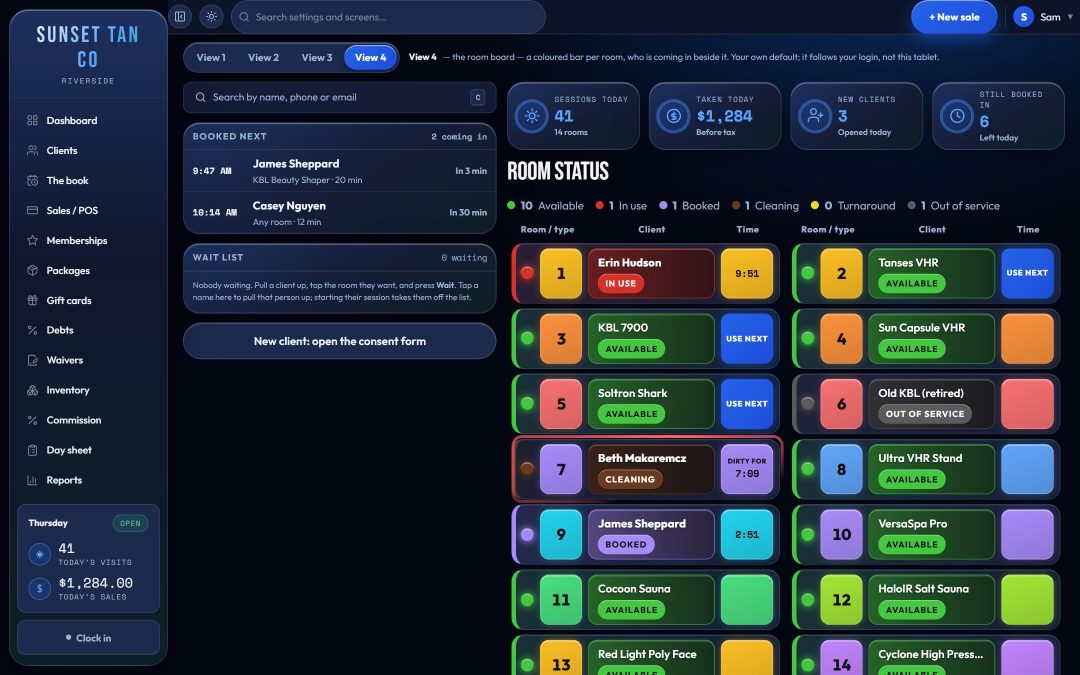
TanVision runs in a web browser, with nothing to install on the desk PC. Sign in on the counter computer, a tablet on the wall or your phone, and you see the same floor: a tile for each room with its photo, whether it is free, running or needs cleaning, and the time left.
The board is live in every open browser. When one screen starts a session, the others update without anyone pressing refresh, and a half-typed time or an open check-in survives the update. That keeps a till at the counter and a board on the wall in step about whether room 3 is free.
There are four layouts to choose from, and one of them follows a classic room-status board, with status lights and color-coded boxes. See the front desk.
Built for the desk, a tablet and a phone
- Every screen has been laid out and checked at phone, tablet and desk sizes.
- Each device keeps its own light or dark theme, because a counter monitor under bright ceiling lights and a phone at home want different settings.
- Staff check a regular in by searching or scanning a keytag. The Enter key from a scanner never starts a bed by accident, and one press of Start makes exactly one session.
- Staff clock in and out from any screen, and a manager can fix a missed punch.
- Owners and managers can open the day sheet, the close-out and reports from wherever they are signed in.
More on check-in and staff roles and the time clock.
Paperwork done on the client's own phone
Your salon gets a public consent form link. Clients fill it in and sign on their own phone or a tablet, and they are on file straight away. The signature is kept in private storage with the exact wording the client agreed to, and editing your form later never changes a waiver already signed. The marketing opt-in is always a separate, unticked box.
At check-in, a session cannot start without a signed warning statement and a date of birth on file, and a minor needs guardian consent on file. See consent forms.
Your salon's online shop page works the same way. Clients sign in with a code texted to their phone and place an order, paid for online at checkout where the salon turns that on, or at the desk when they collect.
The same rules on every screen
Every screen runs the same rule engine against the same records, so the counter PC and the tablet cannot disagree about who may tan. The exposure limits follow the salon's own settings, capped at each unit's maximum. A time typed above the limit is refused with the reason on screen, never quietly cut. The gap between UV sessions is your setting, from 0 to 168 hours, and at 0 the desk still sees a warning for a second UV session inside 24 hours. Spray, red-light, sauna and wellness rooms skip skin typing and the exposure schedule.
Lamp hours are worked out from the sessions each room runs, per lamp group such as face, top canopy and bottom, with Change soon and Change now warnings for managers. See exposure safety.
Each salon's data, kept apart
Every salon sees only its own clients, sales and settings, and the database enforces that, not just the screens. It is tested by signing in as a second salon and trying to read and change the first salon's records. The latest run, on September 22, 2026, covered 71 tables, and every cross-salon read and write was refused.
Inside your salon, access is set per job. Front-desk staff get the floor, check-in, the till, clients, appointments and the time clock. Jobs such as rooms, tax, stock and timesheets can be given to the whole team or to one person, and the database checks those limits too.
What to know before you switch
- TanVision needs an internet connection at the desk. It does not offer an offline mode today.
- With T-Max timer controllers, the desk sends each session's time to the bed's own timer, through a small box TanVision supplies that sits on your network next to the T-Max controller. Other timer brands are not supported yet.
- Card payments run through TanVision's built-in card processing, on your salon's own merchant account, with a supported card terminal at the counter.
- Running several shops from one account is not finished. Staff cannot be assigned to a shop yet, and a tax category cannot vary by location.
Want to see the live board on a phone? Book a demo.
Common questions
- What is cloud-based tanning salon software?
- Software that runs online and opens in a web browser, instead of being installed on one PC at the counter. TanVision works this way: any signed-in computer, tablet or phone sees the same live room board, clients and reports.
- Can I check my tanning salon from my phone?
- Yes. Sign in to TanVision in your phone's browser to see the live room board, the day's sales and your reports. Every screen has been laid out and checked at phone size.
- What happens if the salon's internet goes down?
- TanVision needs an internet connection to run. It does not offer an offline mode today, so plan how the desk will work during an outage before you rely on any cloud system.
- Can another salon see my client list?
- No. Each salon sees only its own data, the database enforces it, and that is re-tested by signing in as a second salon and trying to reach the first salon's records.
- Does it work for more than one location?
- Not yet. Support for several locations is not finished: staff cannot be assigned to a shop, and a tax category cannot vary by location. If you run several salons, raise it in a demo.