
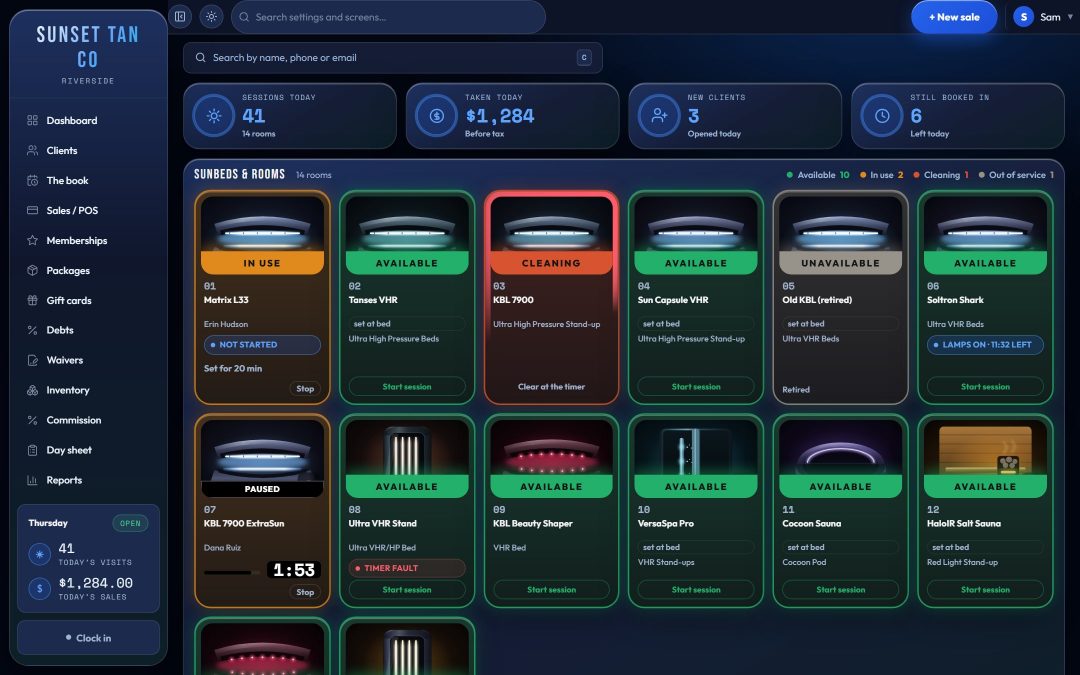
Two kinds of software, built around different days
A general booking app is built around a calendar: a service, a length, a staff member and a time slot. That fits a business where every visit is an appointment.
A tanning desk runs on different questions. May this client have a UV session right now? For how long, given their skin type, how far into building a tan they are, and this bed's maximum? Does their package cover this bed, or do they owe an upgrade? Is the room clean? Are the lamps due? Tanning salon software is built around those questions. A calendar can be part of it, but it is not the center.
What to ask a booking app, and how TanVision answers
Use this as a checklist. The middle column is the question to put to any general booking app you are considering. The right column is what TanVision does today.
| The job at a tanning desk | Ask a general booking app | In TanVision |
|---|---|---|
| Skin type before UV | Can it refuse a UV session until a skin type is on file? | With Use skin type on, a UV room will not start without a Fitzpatrick type, and each skin type is capped at a highest bed level. |
| Exposure time | Does it know each bed's maximum minutes and refuse a longer time? | A time above the recommended limit or the room's maximum is refused with the reason on screen, never trimmed. |
| A returning client | Does a client back after months away start the build-up again? | By default, after 14 days away a client's progress halves, and halves again every further 14 days, down to session 1. |
| Time between UV sessions | Can it block a second UV session inside the gap you require? | You set the gap from 0 to 168 hours. Check-in refuses an early session and shows when the client is next eligible. |
| Paperwork and age | Can it block a session with no signed consent or date of birth? | No signed warning statement, no date of birth, or a minor without guardian consent on file: the session cannot start. |
| Bed levels | Can a package include some beds, charge for others and deny the rest? | The access matrix sets included, an upgrade price or not allowed per package, and the desk charges the upgrade before the bed starts. |
| Packages | Does a package become a balance that counts down, with expiry and visit limits? | Balances count down on their own, with expiry dates and daily or weekly limits. Sessions, price and expiry are locked in at the sale. |
| Room status | Does it show which rooms are free, running or need cleaning? | The live board shows each room's state and time left, with a ring around a room that needs cleaning and one-tap Mark clean. |
| Lamps | Does it track lamp hours per bed? | Lamp hours are worked out from sessions per lamp group, with Change soon and Change now warnings. |
| Tanning excise | Can it keep the 10% federal tanning excise apart from sales tax? | Excise is a separate rate on each item, stored per line and reported in its own section. |
| Non-UV rooms | Can spray and red-light rooms skip the UV rules? | Spray, red-light, sauna and wellness rooms skip skin type and the exposure schedule. Paperwork and age still apply. |
The skin-type limits and the build-up curve are TanVision's own conservative defaults, not law. Your salon decides whether to use skin typing and how long the gap between UV sessions is.
When a general booking app is enough
If you only offer spray tans by appointment, most of that table does not apply. There are no UV limits to enforce, and the IRS says the 10% indoor tanning excise does not apply to spray-on tanning. A good booking app may be all you need.
Once you run UV beds, those rules are part of every check-in. Any of them your software cannot do becomes something staff have to remember on a busy Saturday.
Exposure rules belong in the software, not in memory
Federal rules require each sunlamp product's label to give a recommended exposure schedule and a maximum exposure time in minutes (21 CFR 1040.20). State rules add their own requirements, and they vary; see tanning laws by state.
TanVision recommends a time from the client's Fitzpatrick skin type and where they are in building a tan. The exposure limits follow the salon's own settings, capped at each unit's maximum, so set each room's maximum minutes from the unit's label. It does not load the manufacturer's schedule.
Staff type the minutes, and the field never fills itself in, because a prefilled number gets accepted on autopilot. Anything over the limit is refused with the reason on screen. More in the exposure schedule guide, Fitzpatrick skin types and exposure safety.
Bed levels are a pricing job, too
Selling bed levels means deciding, for every package, which beds it opens. TanVision's access matrix holds that decision per room or by category: included, an upgrade price, or not allowed, with a walk-in row at the single-visit price. At check-in the desk sees the upgrade price before the bed starts, and the charge is recorded as a real sale. The matrix also warns you when a cheaper package opens a room that a more expensive one does not.
Access is commercial and exposure is safety, so the two are kept apart. With skin typing on, paying for an upgrade never lifts a client's skin-type limit. See bed levels and upgrades.
The tax a booking app may not expect
The IRS says many businesses that offer indoor tanning services must collect a 10% excise tax, generally when the client pays, and file it quarterly on Form 720 (IRS indoor tanning services tax center). That is separate from the sales tax you owe your state.
If both taxes sit in one tax line, rebuilding either return means pulling them apart by hand. TanVision stores sales tax and excise as two figures on every line, each with the rate used, prints them on separate receipt lines, and gives the excise its own section in the tax report. More in the tanning excise tax guide and tax and excise.
Questions to ask any tanning software vendor
- Does it refuse an exposure time over the limit, or quietly change it?
- Can I set the gap between UV sessions that my state requires?
- Does it keep the exact wording each client signed?
- Does it charge a bed-level upgrade before the session starts?
- Does voiding a sale cancel the package it sold?
- Is the excise kept apart from sales tax on the receipt and in the tax report?
- Does it process cards and bill memberships automatically? TanVision does, through its built-in card processing: a supported card terminal at the counter, monthly auto-pay on a card the client saves, and payment at checkout in the online shop.
- Does it send the time to the bed timers, and which timer brands does it support? TanVision does with T-Max timer controllers, through a small box it supplies that sits on your network. Other timer brands are not supported yet.
The longer list is in the tanning salon software checklist. To see these answers on screen, book a demo.
Common questions
- What is the difference between tanning salon software and a regular booking app?
- A booking app is built around appointments on a calendar. Tanning salon software is built around the rules of a UV session: skin type, time limits per bed, the gap between sessions, bed-level access, lamp hours and the 10% tanning excise. TanVision is built around those jobs, and checks the session rules at every check-in.
- Can I run a tanning salon on a general booking app?
- You can if you mainly sell spray tans by appointment. With UV beds, check whether the app can enforce exposure limits, session gaps, paperwork and upgrades. If it cannot, those checks fall to your staff.
- Does TanVision take appointments?
- Yes, at the desk. Staff book a room for a service, the day's bookings show on the floor board, and the database refuses two live bookings for the same room at the same time. TanVision is not a client-facing online booking app today.
- Do spray tans and red light follow the same rules as UV beds?
- Not in TanVision. Spray, red-light, sauna and wellness rooms are not UV equipment, so they skip skin type and the exposure schedule. Paperwork, age and room status still apply.
- Does TanVision control the tanning beds?
- Yes, with T-Max timer controllers. TanVision checks whether a client may tan and whether the time is within the limits, then the desk sends the session's minutes to the bed's own timer, through a small box TanVision supplies that sits on your network next to the T-Max controller. Stop clears the time. Other timer brands are not supported yet.