
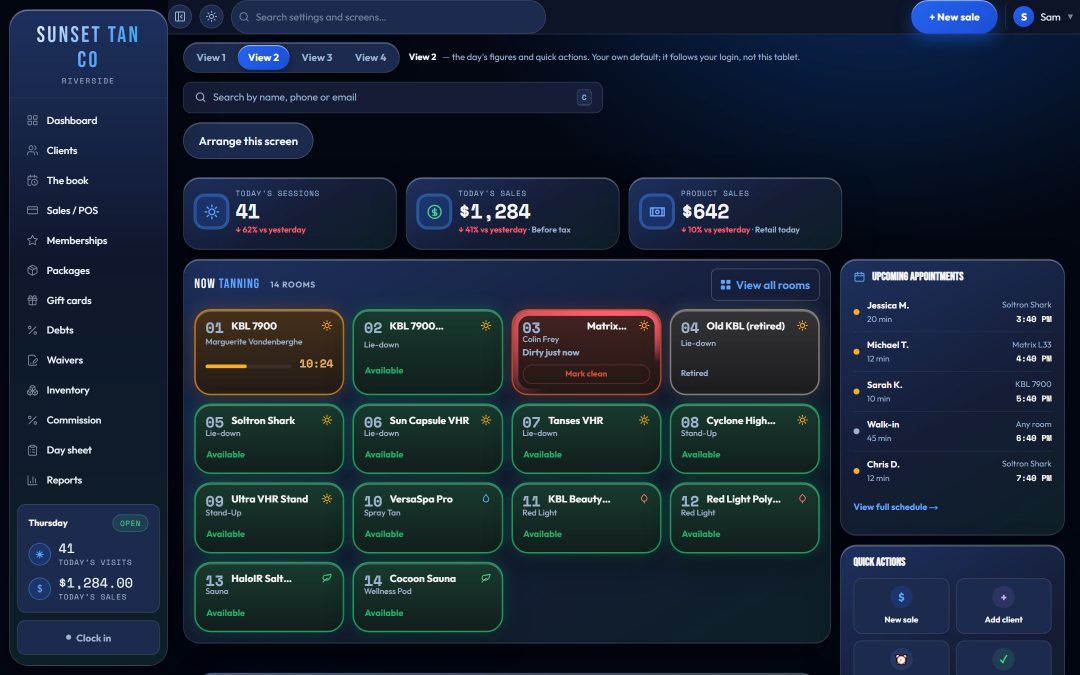
The upgrade that never gets charged
Selling bed levels only works if the desk charges for them. A client on a basic package asks for the premium bed on a busy afternoon, and the desk has to guess a price, refuse, or let it go. Every guess costs money or goodwill.
TanVision puts the answer in the software. A manager sets a rule for every package and every room once, and check-in reads it each time.
Levels, rooms and the access matrix
Each room has a level from 1 to 6, set at Settings → Rooms with its type and maximum minutes. What each level means is your decision. The level is the fallback the access matrix prices a room by when no rule names it, and, if you use skin typing, the number the skin-type limit further down this page is checked against.
The access matrix, at Settings → Access matrix, gives each package one of three answers for each room:
| Setting | At check-in |
|---|---|
| Included | The package covers the room at no extra charge. |
| Charge | The client can use the room for a set upgrade price, taken before the bed starts. |
| Denied | The package does not open the room at any price. |
Rules are set per room because two rooms on the same level are not always the same product. A package can cover the sauna but not the spray booth. Levels stay underneath as a fallback, so a room added next month inherits its level's rules instead of arriving unpriced.
A package's rule for a room can also open it without using a session. A ten-visit tanning pack can include the sauna, and a sauna visit leaves the balance where it was.
Walk-ins get their own row: the single-visit price for each room, charged to a client with no package that covers it.
Categories: set it once for many packages
Setting every cell for every package is slow, and most of it repeats. A category is a named set of room rules that many packages point at, so one change to the category reaches every package in it.
- A rule for one package and one room still overrides its category, for the exceptions.
- A category has a default, included or denied, for any room it does not name, so a room you add later is covered by a rule from the start.
- The order is always the same: the package's own rule for the room, then its category's rule, then the category's default, then the level.
What the desk sees at check-in
- With a package picked, each room on the floor board that the package does not simply include shows a chip: the upgrade price, not on this package (with the single-visit price), not available, or no rule set. Covered rooms show no chip.
- If the room needs an upgrade, the session will not start until the desk accepts the charge. The price comes from the matrix; the desk does not type it.
- The upgrade is recorded as a sale line that says what it was for, so it appears on the day sheet, the close-out and the tax report like any other money.
- If the desk picks a package that does not cover the room, TanVision refuses rather than quietly starting the session with no package attached.
- With no package picked, TanVision finds the best outcome the client is entitled to: included before paid, a cheaper upgrade before a dearer one, and a used-up package skipped so the visit falls to the single-visit price.
- A client's record lists every room each package opens and what each upgrade costs, so the desk can quote it before the client walks to the room.
Catching a pricing mistake
A grid of packages and rooms is easy to get wrong, and the costliest mistake is a cheap package that opens a premium room a dearer package refuses. TanVision checks your settings against themselves and flags each cheap package that does this, widest price gap first.
It reports and never blocks, because a cheap wellness pass that reaches a room your mid-tier UV package excludes may be exactly what you meant. Charging an upgrade price is never flagged; that is the matrix working.
Skin type sets a limit an upgrade cannot buy
Access is commercial. Exposure is a separate check. When your salon uses skin typing, each Fitzpatrick type has a highest bed level for UV rooms in TanVision's built-in defaults: Type I up to level 1, Type II up to level 2, and so on to Type VI at level 6. These are software defaults, not law.
Paying for an upgrade opens a room. It does not lift that limit. If the room's level is above the limit for the client's skin type, the session is blocked and the screen names both numbers and where each is set: the room's level at Settings → Rooms, or the skin type on the client's record. Switch skin typing off at Settings → Tanning rules and the level limit goes with it.
The limit applies only to UV rooms. Spray, red light, sauna and wellness rooms skip skin typing and the level limit, while the age check, the consent form and the room's status apply to every room. See exposure safety, spray tan and red light and the Fitzpatrick skin types guide.
Related features
Memberships and packages sets what each package holds, check-in runs the upgrade at the desk, and reports show sessions and minutes per room. For pricing ideas, read how to price tanning memberships. To see the access matrix with your own rooms and packages, book a demo.
Common questions
- What are tanning bed levels?
- In TanVision, a level is a number from 1 to 6 that a salon gives each room to tier its equipment. The salon decides what each level means, which packages include it, and what an upgrade into it costs.
- How do tanning bed upgrades get charged?
- When a client's package does not cover the room they pick, TanVision shows the upgrade price from the access matrix and will not start the bed until the desk accepts the charge. The charge is recorded as a sale line and appears on the day sheet and the close-out.
- Can a package include the sauna or red-light room without using a session?
- Yes. A package's rule for a room can open it without taking a session off the balance, so a tanning pack can include the sauna and a sauna visit costs the client nothing from the pack.
- Does a paid upgrade override skin type limits?
- No. When skin typing is on, each skin type has a highest bed level in TanVision's defaults, and paying for an upgrade does not lift it. The desk sees which limit blocked the session and where it is set.
- Can clients move up a level automatically as their tan builds?
- No. TanVision does not step clients up levels on its own, and upgrade prices are not prorated. Each room has a set upgrade price per package, and the desk rings it up at check-in.