
Why paper waivers fail at the desk
A paper waiver sits in a binder until somebody needs it. When a client asks what they signed, or an inspector asks to see it, the desk goes looking. When you update the wording, nobody can say which clients signed the old version.
TanVision moves the consent form onto the client's phone and files it against their record the moment they sign. Then it checks the paperwork on every check-in, so a busy afternoon cannot skip it.
How clients sign
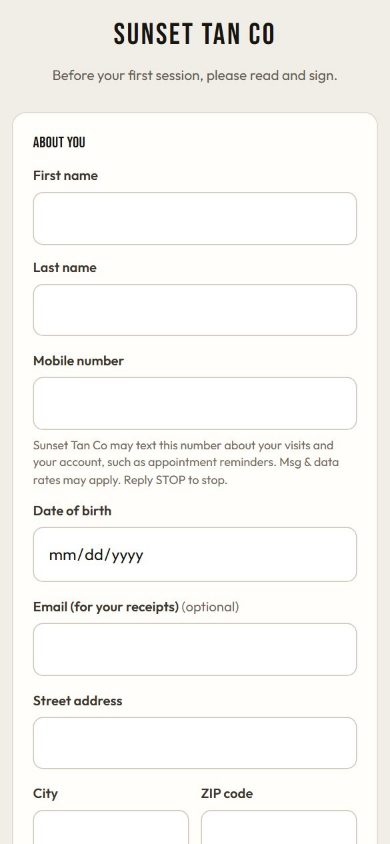
- Your salon gets its own public signing link. Clients open it on their phone, or on a tablet at the counter, fill in their details and sign on the screen.
- The form is on file as soon as they submit. A new client gets a client record straight away. A returning client is matched by mobile number, and details already on file are kept rather than overwritten.
- The signature image is stored privately. Staff open it through a link that expires after five minutes, never through a public address.
- The time of signing is set by TanVision's server, not by the client's device.
- The Waivers page shows whether the form is accepting signatures, with buttons to copy or open your link.
What each signed record keeps
A consent form is only useful if it shows what the client actually agreed to. TanVision stores the full text on every signed record, not a pointer to whatever the current version says.
- The exact wording the client saw, with its version.
- Their signature and, for a client under your minimum age, a parent or guardian's name and signature.
- Their answers to your own questions, each stored with the question as it was worded that day.
- The date and time they signed.
Editing your wording never changes a record already signed. The Waivers page marks each signed form as on the current wording or an earlier one, so after a change you can see who signed the old text. An earlier version is shown as a neutral note, not as a failure.
Your wording and your questions
Every salon starts on a built-in warning statement and consent with five sections: a UV warning, protective eyewear, the exposure time the salon sets, a health disclosure, and a statement that the details given are accurate. It is a starting point. Edit or replace any section at Settings → Waiver wording, and have your attorney approve the text before it goes live.
You also decide what the form asks:
- Rename, require or hide the optional fields, such as email and street address. A hidden field is not asked and not stored.
- Add your own questions as short text, long text, multiple choice or a checkbox, and make any of them required. A required checkbox has to be ticked.
- Reword four fields but never remove them: first name, last name, mobile number and date of birth. The number is how a returning client is matched, and the date of birth drives the age check. The settings screen gives the reason beside each locked field.
The paperwork check at check-in
The consent form matters most when a bed is about to start. TanVision checks the client's paperwork on every check-in, for every kind of room, and shows the desk the reason when it says no.
- No signed warning statement on file: the session cannot start.
- No date of birth on file: the session cannot start, because age cannot be checked.
- Under the salon's minimum age with no guardian consent on file: the session cannot start. With guardian consent on file, the desk sees a note that the client is a minor.
Age is worked out from the date of birth already on the client's record, on the salon's own calendar day. For a returning client, a date typed into the public form cannot replace the stored one, so a form submission cannot switch the guardian requirement on or off.
Each salon's minimum age is 18 by default. TanVision does not know your state's law, and by default guardian consent on file lets a client under the minimum age tan. If your state bars minors from UV tanning, set Minors and UV rooms to No under Settings → Tanning rules, and UV rooms refuse them even with consent on file. Check your state's rules on minors before you accept consent, starting with tanning laws by state.
Marketing consent stays separate
The form can also ask whether the client wants your deals by text and email. That box is separate from the consent to tan, starts unticked and is optional, so signing the waiver never signs anyone up for marketing. You can attach a sign-up reward to the box, such as money off a next visit. TanVision's text campaigns, welcome texts and "we miss you" texts go only to clients who ticked it.
A client who asks to stop is never texted, and that is checked by phone number, not by record. The text message rules guide explains why the two consents stay apart.
Keeping records complete
The Clients list flags anyone with no waiver on file, and the Incomplete records report lists anyone missing a waiver, a skin type, a date of birth or a way to contact them. The Waivers page is open to front-desk staff, because whether a client has signed is a desk question. Editing the wording stays with managers unless you hand that job to staff.
TanVision does not put an expiry date on a consent form or ask clients to sign again after a set period. If your state or your attorney requires re-signing, the client signs again through the same link and the new record is filed beside the old one. The tanning consent form guide and the recordkeeping guide cover what to keep and for how long.
Related features
The signed form is one part of check-in. Exposure safety uses the skin type and visit history on the same record, check-in runs the paperwork gate, and client records keep the signed form beside packages and visits. To see the form and the gate with your own wording, book a demo.
Common questions
- Can clients sign a tanning waiver on their phone?
- Yes. Each salon has a public signing link. Clients open it on their phone or a counter tablet, fill in their details and sign, and the form is on file as soon as they submit.
- What should a tanning salon waiver include?
- That depends on your state, so have your attorney approve the final text. TanVision's built-in statement covers a UV warning, eyewear, the exposure time the salon sets, a health disclosure and a consent line, and you can edit every section. The tanning consent form guide covers what state rules ask for.
- Is the built-in warning the same as the federal label warning?
- Not word for word. It is based on the warning statement that the federal sunlamp standard, 21 CFR 1040.20, requires on the equipment's label, and it opens with 'Warning' where that label text opens with 'DANGER'. The federal rule sets the equipment label. What your consent form must say is a question for your state's rules and your attorney.
- What happens to signed forms if we change the waiver wording?
- Nothing. Each signed record keeps the words its signer saw. The Waivers page then marks each signed form as on the current wording or an earlier one.
- Does TanVision make clients re-sign every year?
- No. It records when each client signed and which wording, but it stores no expiry date and does not prompt a re-sign. If you need a client to sign again, they use the same link and the new record is added beside the old one.
- How does the consent form handle minors?
- If the date of birth puts a client under the salon's minimum age, the form asks a parent or guardian to add their name and signature. At check-in, a client under the minimum age with no guardian consent on file cannot start a session. TanVision does not know your state's age rules, so check your state's tanning laws before accepting guardian consent. Where your state bars minors from UV tanning, Settings → Tanning rules can refuse UV rooms to them even with consent on file.