
Find the client in one scan
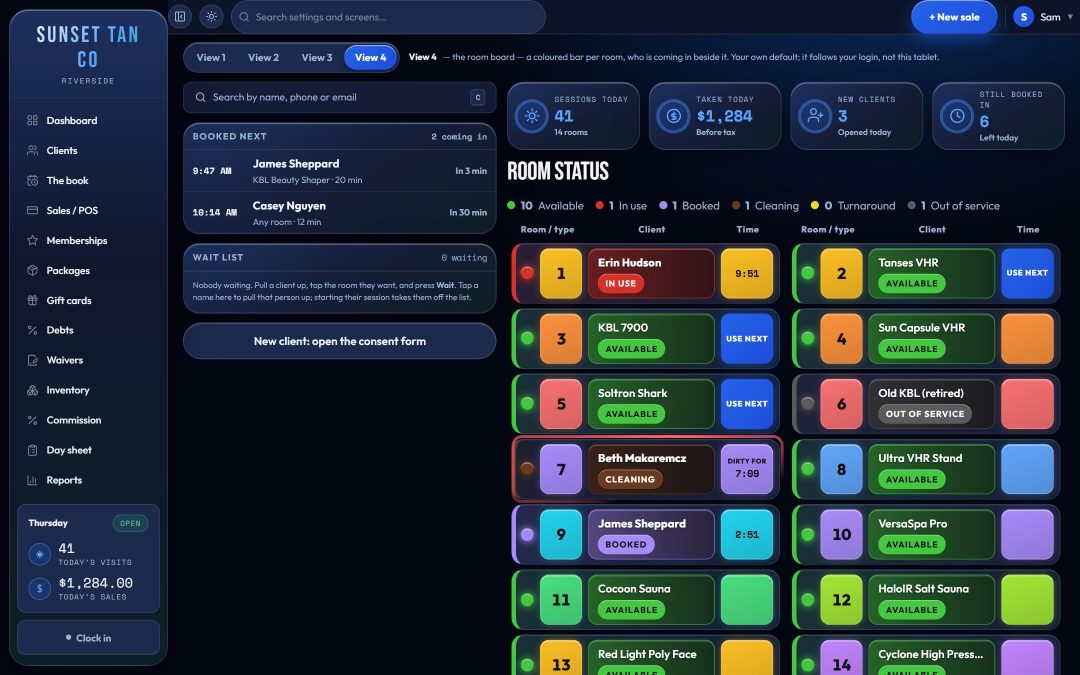
Press C, click the search box or tap Start session on a free room, and the check-in drawer opens over the board. The board stays in view beside it, because that is where the room gets picked.
The scan box searches across the client record, not one barcode column: the keytag code, name, phone numbers, email, address and notes. Keytags printed for an old system keep working as long as their code is stored somewhere on the record, and no format is forced on a tag, so nobody has to re-tag a client list. If the salon issues wallet loyalty cards, the card's barcode works as the keytag.
A scanner types digits and then Enter into whatever has focus. In TanVision, Enter never starts a bed, and the single-letter shortcuts do nothing while someone is typing in a field.
The record and check-in are one drawer
Searching opens the drawer on the client's full record: packages, visits, purchases, anything they owe, consent status and notes. One click flips it to check-in and back, and nothing is lost on the way. A typed time, the room and the package pick all survive the round trip.
A note can be set to interrupt, one client at a time. It then shows as a band when that client is pulled up, so the note that matters reaches the desk without every ordinary note turning into a pop-up.
Tap a live package on the record to start a session on it; the caret beside it lists every room the package opens and what each upgrade costs. Pressing T on the client's record carries the client and the package to the board, where the only choice left is the room.
Pick the package and the room
When a client holds two or more packages, nothing is pre-selected. Start reads "Can't start — pick what this comes off" until the desk chooses, because a package chosen silently is a wrong deduction nobody notices.
With a package picked, every room on the board shows what it means for this client. When the room is not simply included:
- An upgrade shows its price before anything starts. The session is not written until the charge is accepted, and the upgrade is recorded as a sale line, so it lands on the day sheet, the close-out and the tax report.
- A walk-in on no package pays the single-visit price the salon set for that room.
- A named package that does not cover the room is refused, rather than starting a free session that deducts nothing.
- A package at its daily or weekly visit limit blocks the package, not the person. The screen offers "No package — single visit" so the client can be rung up as a walk-in.
A package works for the whole of its last day on the salon's own clock, and when two or fewer sessions are left, the desk sees a note to mention it.
Type the time, then Start
The minutes box starts empty every time. The most this client may have in this room is printed under it, with where that limit came from: their skin-type schedule at this session, or the room's own maximum. A prefilled number gets accepted on autopilot; a typed one gets read.
A time above the limit is refused, not trimmed. Type 20 where 12 is allowed and the screen says 20 min is too long, gives the reason and asks for 12 or less. A shorter time is always accepted.
When Start cannot start, its label is the reason, such as "Can't start — pick a room" or "Can't start — type a time". One press makes exactly one session: a double tap on a touch screen or a retry after a dropped connection cannot write a second session or charge a second walk-in fee, because each attempt carries its own ID and the database refuses a duplicate.
The checks every session passes
The same check runs on the screen and again on the server before a session is saved, so nothing depends on the screen alone. A session starts only when all of these hold:
- A signed warning statement is on file. Clients can sign the salon's consent form on their own phone before they reach the desk.
- A date of birth is on file. A client under the minimum age, 18 by default, needs guardian consent on file, and age is worked out from the stored date of birth on the salon's calendar day.
- The client record is active, and the room is not marked for maintenance or retired.
- The package is active, not expired, has sessions left and is inside its visit limits.
- For UV rooms, the skin-type rules, the gap between sessions and the exposure limit all pass. See exposure safety.
By default, guardian consent on file lets a minor through this check. If your state bars minors from UV tanning even with a parent's consent, set Minors and UV rooms to No under Settings → Tanning rules: UV rooms then refuse a client under the minimum age even with consent on file, while spray, red light and wellness rooms still accept it. Check your state's page under tanning laws.
Spray, red light and sauna use the same check-in
Non-UV rooms use the same drawer and the same Start. Skin type and the exposure schedule do not apply there, and the room's own session length is the limit. Paperwork, age and room status still do. Whether a room counts as UV comes from the salon's own kinds of room, and a new kind starts as UV until someone unticks it. See spray tan and red light.
Related features
Check-in sits on the front desk board and draws on memberships and packages, bed levels and upgrades, consent forms and client records. To watch a check-in from scan to Start, book a demo.
Common questions
- Can staff use a keytag scanner with TanVision?
- Yes. The scan box searches the keytag code, name, phone numbers, email, address and notes on each client record, so existing keytags work wherever their codes were stored. Enter from the scanner never starts a bed.
- What happens when a client wants a higher-level bed than their package covers?
- The desk sees the upgrade price the salon set before anything starts. If the client accepts, the upgrade is recorded as a sale line and the session can start. If the salon uses skin typing, the highest bed level for the client's skin type still applies, and no price lifts it.
- Can the front desk change the exposure time?
- Staff type the time for every session and can always type less than the limit. They cannot go over it. Each room's maximum is set under Settings → Rooms.
- What if someone presses Start twice?
- One press makes one session. A double tap or a network retry is recognized as the same attempt, so no second session is written and no second fee is taken.
- Does TanVision process card payments at check-in?
- At the till, yes. With a supported card terminal at the counter, TanVision's built-in card processing sends the amount to the terminal and records the approval on the sale. A walk-in or upgrade charged in the check-in drawer is recorded with the tender the desk picks, so a card there is taken on the salon's own machine and recorded as Card.