
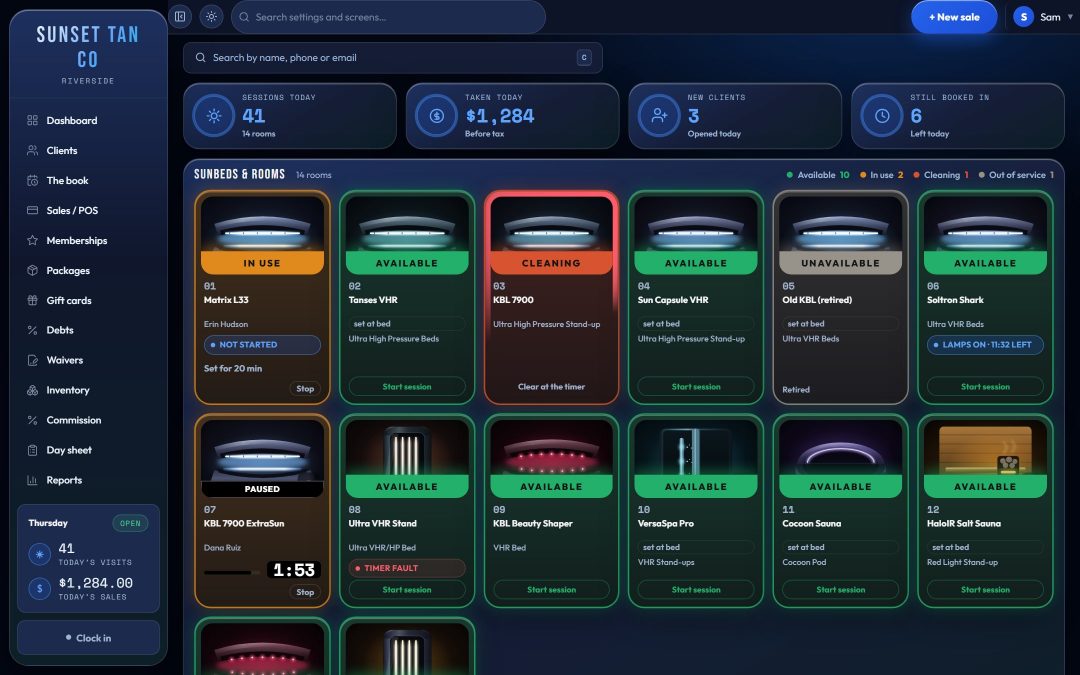
The whole floor on one screen
A tanning desk answers the same question all day: which room is free, and who is in the others? TanVision's floor board draws every room in the salon, from lie-down beds and stand-ups to spray booths, red light and sauna, as a tile or a row. Each one carries its state as a word and a color, so the board reads from across the counter.
- Available: ready for the next client.
- In use: who is in the room and the time left on their session.
- Booked: an appointment made at the desk starts in the room within the next 45 minutes.
- Cleaning: the session has ended and nobody has marked the room clean yet.
- Out of service: marked for maintenance, so check-in will not start it.
Once the salon numbers its rooms, the board shows those numbers, and a room keeps its place on the board whatever its state, so the desk learns where room 12 sits. Each room shows its own photo, added by the salon, or artwork for its kind until a photo exists. When two rooms share a name, the photo is how the desk tells them apart.
Four views, one set of controls
Each person picks the view that suits their counter, and the choice is saved to their login.
- View 1: a photo tile per room, with the day's four figures above the board: sessions today, money taken today before tax, new clients and bookings still ahead.
- View 2: an overview that compares today's sessions, sales and retail with yesterday's, with blocks such as the wait list and upcoming appointments beside the rooms. Managers can arrange its blocks.
- View 3: a room status table that filters by kind of room.
- View 4: a desk board modeled on a classic room-status screen, with a status light, the room number and time boxes in the room kind's color, and a status bar carrying the client's name. Its left column holds the client search, today's next bookings, the wait list and a link to the consent form.
The views are looks, not separate systems. Check-in, the client record, the minutes box and Start are the same code in all four, so a session started from a table row behaves exactly like one started from a photo tile. When a client is pulled up, the day's figures step aside and the screen is about the rooms.
Live on every screen at the desk
Most salons run more than one screen: a till at the counter, a monitor on the wall, an owner's phone. The board keeps asking the server whether anything on the floor has changed, and when something has, every open copy redraws itself. Nobody presses refresh, and a half-typed time, an open check-in and a picked package all survive the redraw.
Cleaning you can see from across the room
A room needs cleaning from the second its session ends, and it stays that way until someone taps Mark clean, which works from every view. A moving red ring goes around a dirty room on all four. On View 4 the room's time box reads Dirty for and counts up, because a number that grows reads as a chore nobody has done, where a countdown reads as a room sorting itself out.
When a kind of room has two or more rooms, View 4 marks the freshest ready one Use next, worked out from each room's lamp hours, so use spreads across the lamps without the desk ever seeing the hours. Lamp hours by group (face, top canopy, bottom or any group the salon names), with Change soon and Change now warnings, stay on the manager's side under Settings → Rooms. See the lamp replacement guide for planning a re-lamp.
What a package opens, room by room
Pull up a client and pick one of their packages, and the board answers a different question: where can this person go? A line says whose prices are showing, and every room the package does not simply include carries a chip with the upgrade price, or says the room is not on the package or not available. A room with no chip is covered.
Which package opens which room, and at what upgrade price, is set once in the access matrix. See bed levels and upgrades.
Bookings and the wait list
A room with a desk appointment in the next 45 minutes shows as Booked, and the day's figures count how many bookings are still ahead. The database itself refuses two live bookings for the same room at the same time, so two people at two screens cannot double-book a bed. The wait list takes a specific room, a kind of room such as any stand-up, or whatever comes free first.
Built for the counter, a tablet and a phone
Every screen is laid out for a counter monitor, a tablet by the beds and a phone. Each device keeps its own light or dark theme, so a bright counter and an owner's phone at night each get the one that reads best. TanVision runs in the browser, so an owner can check the floor from anywhere with a connection.
Front-desk staff get the floor, check-in, the till, clients, appointments and the time clock. Reports and settings belong to managers by default, and a manager can hand a specific job, such as rooms or stock, to the whole team or to one person. See staff roles and the time clock.
Related features
The board is where the desk works. These pages cover what happens once a client is pulled up: check-in, exposure safety, client records and bed levels and upgrades. To see the board on a live screen, book a demo.
Common questions
- Can tanning salon software control tanning bed timers?
- TanVision does, with T-Max timer controllers. When a client is checked in, the desk sends the session's minutes to that bed's own timer, through a small box TanVision supplies that sits on the salon's network next to the T-Max controller. The board shows the time left, and Stop clears the time. Each room's T-Max address is entered in TanVision. Other timer brands are not supported yet.
- What is the difference between tanning salon software and a booking app?
- A booking app keeps a calendar. A tanning desk also needs each room's live state, which rooms need cleaning, what a client's package opens and whether a client may use a UV bed today. TanVision's board and check-in handle those in one place. See tanning software vs booking apps.
- Does the board stay in sync across several computers?
- Yes. Every open board checks the server for changes on the floor and redraws itself when something changes, so the till, the wall monitor and a phone show the same rooms without anyone pressing refresh.
- Can the front desk run on a tablet or a phone?
- Yes. Every screen has been laid out and checked at phone, tablet and desk sizes, and each device can use a light or dark theme.
- Does the front desk see lamp hours?
- Not directly, by design. Lamp hours by group, with Change soon and Change now warnings, are on the manager's Rooms settings. On View 4 the board uses them only to mark which ready room to use next.