
The UV rules stay with the UV rooms
A tanning salon rarely sells only beds. The spray booth, the red light bed, the sauna and the wellness pod all go through the same desk, often on the same membership. Gating them on a Fitzpatrick assessment would refuse service for no reason, so TanVision checks whether a room emits UV before it applies its skin-type rules.
In a room that does not emit UV, TanVision:
- does not ask for a skin type, even when your salon requires skin typing for its beds;
- does not work out a build-up time from the client's skin type and session history;
- does not apply the skin-type level ceiling that, with the built-in defaults, keeps Type I skin off anything above a level 1 bed.
The check-in card notes that the room has no UV exposure, so staff are not left wondering why a spray client with no skin type on file can start.
You decide which rooms emit UV
Rooms belong to room types that you name yourself, such as High pressure, Spray booth or Red light. Each type has an Emits UV tick in Settings > Rooms > Room types, and that tick, not the name, decides which rules apply.
- A new room type starts with Emits UV on. Turning it off is a deliberate step, because a UV bed that skips the checks is the more serious mistake.
- A room the software cannot place is treated as UV.
- If you have not named your own types, the built-in ones apply: lie-down bed and stand-up count as UV; spray booth, red light, sauna and wellness pod do not.
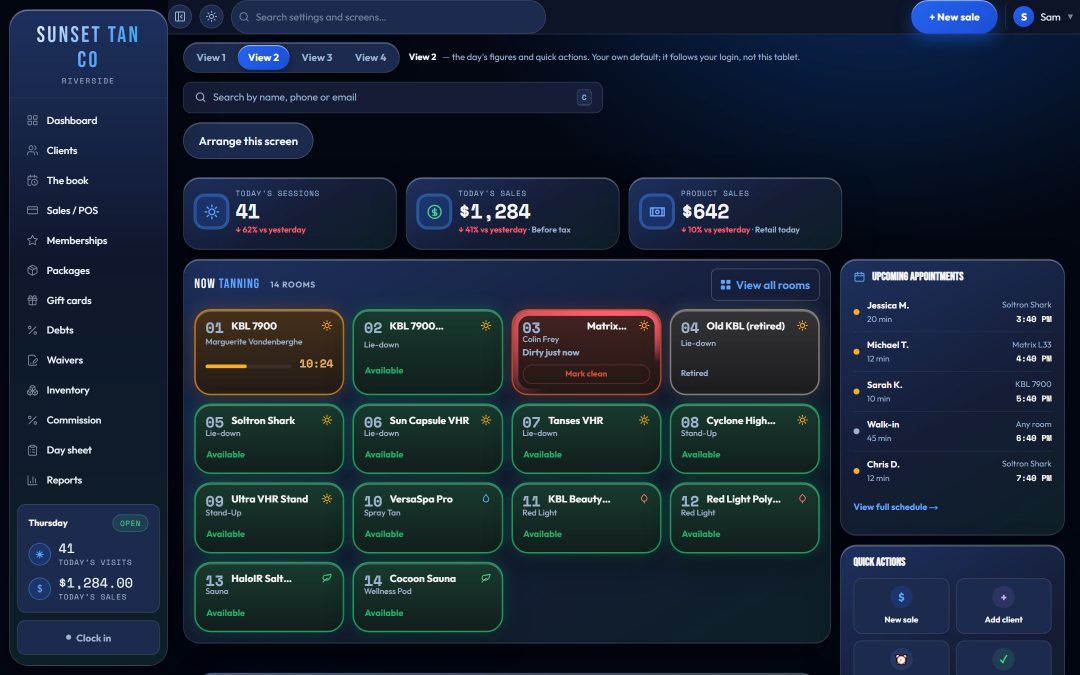
When the floor board groups rooms by type, the same tick splits it: UV room types appear under Tanning and the rest under Wellness, so the desk sees at a glance which rooms get the UV checks.
What still applies in every room
Paperwork, age and equipment status are not UV rules, so a spray or red light session checks them the same way a bed does:
- A signed warning statement must be on file.
- The date of birth must be on file, and a client under your salon's minimum age needs guardian consent on file. One minimum age applies to the whole salon, spray booth included.
- A room marked for maintenance or retired cannot start.
- The package must be live and unexpired, a session pack must have sessions left, and the package's daily and weekly visit limits hold.
- The time typed cannot be longer than the room's own maximum.
Staff type the minutes for every session; the box never fills itself in. In a room that does not emit UV, the room's own maximum is the most they can type. A shorter time is fine, and a longer one is refused with the reason on screen, never quietly cut. Check your own state's rules on the tanning laws pages.
One membership across every room
Which package opens which room is decided by the access matrix, room by room or by category, and it treats a spray booth like any other room. For each package and room you choose included, an upgrade at a set price, or not allowed. Walk-ins pay the single-visit price you set.
So an unlimited UV plan can include the red light bed and charge a set price for the spray booth, while a spray package opens only the booth. When a client's package does not cover the room they want, the desk sees the upgrade price and rings it up as a real sale. See bed levels and upgrades and memberships and packages.
Tax on spray tans
Each item carries its own sales tax rate, and tanning services can carry a separate excise rate that TanVision stores apart from sales tax on every line. The IRS says the 10% indoor tanning tax does not apply to spray-on tanning services (IRS indoor tanning services tax center).
TanVision does not decide that for you: set the excise to zero on your spray items and keep it on your UV packages. Confirm how red light and other services should be treated with your tax adviser. Our tanning excise tax guide covers who pays and how the tax is filed, and tax and excise covers how TanVision records it.
Booking the booth and waiting for one
Once you add a service and save your opening hours, the desk can book a room for it in the appointment book, a spray tan in the booth for example, and the day's bookings show on the floor board. The database refuses two live bookings for the same room at the same time. Payment is still taken at check-in.
When every booth is busy, the wait list can hold a client for one room, for any room of a kind (the next free spray booth, say), or for whatever comes free first.
Related features and guides
Read how exposure safety works in the UV rooms and how consent forms are signed, and see our spray tan DHA guide for booth owners. To walk through your own mix of beds, booths and wellness rooms, book a demo.
Common questions
- Does a spray tan client need a skin type on file?
- No. Skin typing applies only to rooms set as emitting UV. Once its room type has Emits UV turned off, a spray booth, red light bed, sauna or wellness pod starts without one, even when your salon requires skin typing for its beds. The built-in spray, red light, sauna and wellness pod types already have it off.
- Can one membership cover UV beds, red light and the spray booth?
- Yes. For every package, the access matrix sets each room, or each category of room, as included, an upgrade at a set price, or not allowed, so one membership can cover any mix of rooms.
- Is a spray tan subject to the 10% tanning tax?
- The IRS says the indoor tanning tax does not apply to spray-on tanning services. In TanVision you set the excise rate per item, so set it to zero on spray items. Check your own situation with a tax adviser.
- Do age checks apply in the spray booth?
- Yes. Every room checks the date of birth on file against your salon's minimum age, and a minor needs guardian consent on file, whether the room emits UV or not.
- What stops a UV bed from being set up as a non-UV room by mistake?
- New room types start as emitting UV, a room the software cannot place is treated as UV, and turning the tick off is a separate, deliberate step on the room types screen.